Free AI Marketing Readiness Checklist: Is Your Business Ready for AI?
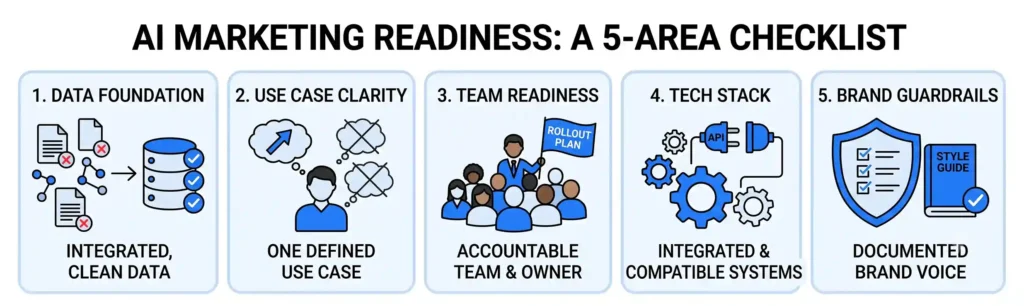
Every business we talk to says they want “to do more with AI.” Almost none of them can answer the follow-up question: ready to do what, exactly, and with what data? That gap is the actual problem. Not a lack of AI tools – there are thousands. The problem is most businesses try to bolt AI onto a marketing operation that isn’t structured to use it well: messy customer data, no clear use case, no one owning the rollout. The result is a chatbot nobody trained properly, or a “content AI” that produces generic copy nobody wanted in the first place. Below is the AI Marketing Readiness Checklist we use with clients before recommending any AI build. It’s a 10-minute self-audit across five areas that actually determine whether AI will work for your business – not a generic “10 AI trends” listicle. Score yourself as you go. Why We Built This Instead of Just Pitching CustomGPT We could have skipped the checklist and gone straight to “hire us to build you a custom AI chatbot.” We didn’t, because half the businesses that come to us asking for a CustomGPT solution aren’t actually ready for one yet – their data isn’t clean enough, or they don’t have a specific use case, and a chatbot built on that foundation underperforms no matter how good the build is. This pattern shows up constantly in discovery calls. A business will say their customer data is “basically fine,” and then it turns out purchase history lives in the e-commerce platform, support tickets live in a separate helpdesk tool, and email engagement lives in a third system that’s never been connected to either. None of those systems talk to each other. An AI chatbot layered on top of that setup doesn’t fail because the AI is bad – it fails because it’s working with a third of the picture. Businesses that catch this before building anything save themselves a rebuild later. That’s what this checklist is for: catching the gap before you spend on tools or a build. How to Score It Each section below has 4-5 questions. Rate yourself honestly from 1 (not at all) to 5 (fully in place) on each question, then add up your total for that section. At the end, you’ll total every section for an overall readiness score out of 100. Section 1: Data Foundation AI is only as good as the data it learns from. This section tells you whether your data is actually usable. If you scored low here: don’t build anything yet. Fixing fragmented or messy data first – even something as simple as connecting your CRM and helpdesk tool – will do more for AI performance than any amount of prompt engineering later. Section 2: Use Case Clarity “We want to use AI” isn’t a use case. This section checks whether you actually have one. If you scored low here: pick one process – usually the one costing your team the most hours or losing the most leads – and start there. Trying to solve five problems with one AI tool is how most rollouts stall. Section 3: Team and Process Readiness Tools don’t fail on their own. They fail when no one owns them. If you scored low here: assign ownership before you assign budget. An AI tool with no one responsible for tuning it will quietly stop being used within a few months, the same way most under-adopted software does. Section 4: Tech Stack Compatibility AI tools need somewhere to plug in. This section checks whether your current systems can actually support that. If you scored low here: this is often the fastest fix on the list. A quick audit of your CRM and website platform usually reveals whether you need new infrastructure or just need to turn on features you’re already paying for. Section 5: Content and Brand Guardrails If AI is going to write, respond, or represent your brand, it needs rules to follow. Most businesses haven’t written those rules down. If you scored low here: this is quick to fix and easy to skip, which is exactly why most businesses skip it. A one-page brand voice doc with a few good and bad examples is often enough to keep AI-generated content from sounding generic. What Your Total Score Means Add up your scores across all five sections for a total out of 100. Who This Checklist Is For This is built for business owners and marketing leads who are past “should we even look at AI” and into “where do we actually start.” It’s useful whether you’re evaluating a custom AI chatbot for customer service or sales, AI-assisted content or campaign production, AI features layered into your existing CRM, or simply whether to build in-house versus bring in a partner. Where to Go From Here Your score isn’t a grade, it’s a map. If you landed in the 80-100 range, you’re in a strong position to move on a custom AI build without wasting time or budget. If you scored lower, you now know exactly which gap to close first, instead of guessing or buying tools that won’t perform on a shaky foundation. Either way, you don’t have to figure out the next step alone. Talk to our team about your results and we’ll tell you plainly whether you’re ready to build, what to fix first if you’re not, and what that would actually involve. Not Sure What Your Score Actually Means? Skip the guesswork. Talk to the Nuclay team and get a clear answer on whether you’re ready to build or what to fix first. Get Your Results Reviewed Frequently Asked Questions (FAQ)