You click on a website, wait three seconds, and leave. Your customers do the same thing to yours. Google’s own research found that the chance of a visitor bouncing rises sharply once a page takes longer than three seconds to load, and most people will not wait around to see what they missed.
If you are asking why your website is slow, the answer is almost never a mystery. It is usually one or two fixable problems that nobody has looked at in a long time.
This post covers the seven most common causes, in plain language, in the order we would check them. You do not need to be technical. You need about ten minutes and a willingness to look at what is actually happening on your site.
First, Measure How Slow Your Website Really Is
Before you fix anything, get a number. Open Google’s free PageSpeed Insights tool, paste in your homepage address, and run the test. It scores your site out of 100 and lists what is slowing it down.
Test on the mobile result first. Most of your visitors are on phones, often on average connections, and mobile scores are almost always lower than desktop. A score under 50 on mobile means you have real work to do. A score above 90 means you are in good shape.
Write down your score. You will want to compare it after the fixes.
1. Your Images Are Far Too Big
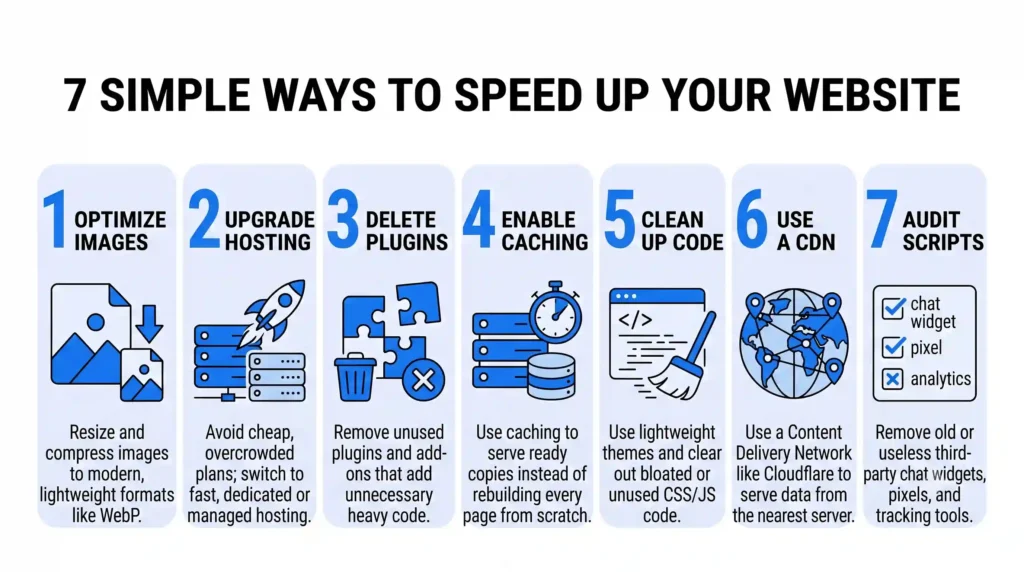
This is the cause behind more slow websites than anything else. A photo straight from a phone or camera can be 4 to 8 MB. A product photo on a web page only needs to be around 100 to 200 KB.
Picture a homepage with six photos, each 5 MB. That is 30 MB of downloading before the page feels finished, and a visitor on a mobile connection will be gone long before then.
What to do:
- Resize images to the size they actually appear on the page. A photo shown 800 pixels wide does not need to be 4000 pixels wide.
- Compress them with a free tool like Squoosh or TinyPNG.
- Use modern formats like WebP, which are much smaller than JPEG at the same quality.
If you only do one thing from this list, do this one.
2. Your Hosting Is Cheap and Overcrowded
Hosting is the server that stores your website and delivers it to visitors. The cheapest plans put hundreds of websites on one machine, and they all compete for the same power.
Here is our honest view: saving a few hundred rupees a month on hosting is a bad trade if it costs you customers. A slow server delays every single page, and no amount of other tweaking can fully fix it.
Signs your hosting is the problem:
- Your site is slow even when the pages are simple
- It gets noticeably worse at busy times of day
- Your PageSpeed report flags a slow “server response time”
If that sounds familiar, move to better managed hosting or a dedicated plan. It is the single biggest upgrade for many business websites.
3. Too Many Plugins and Add-Ons
If your site runs on WordPress, every plugin adds code that has to load. One or two plugins are fine. Thirty is a problem, especially when half of them are things someone installed once and forgot.
Go through your plugin list and ask of each one: do we actually use this? Delete anything inactive or unnecessary. Be especially suspicious of plugins that add sliders, pop-ups, social feeds, and animations. They look nice and cost you speed.
Deactivating a plugin and re-running your speed test is the quickest way to find out which ones are the heavy ones.
4. You Are Not Using Caching
Without caching, your server rebuilds each page from scratch every time someone visits. Caching saves a ready-made copy and serves that instead, which is far faster.
Think of a restaurant that cooks each dish from raw ingredients every time versus one that preps the common items in advance. Same food, much shorter wait.
On WordPress, a caching plugin such as WP Rocket or LiteSpeed Cache can switch this on in a few clicks. Many good hosts also include caching built in, so check that before adding anything.
5. Messy, Bloated Code and Heavy Themes
Some website themes and page builders ship with huge amounts of code you never use. Your page loads all of it anyway.
You cannot easily fix this by clicking a setting, but you can spot it. If your PageSpeed report mentions “unused JavaScript” or “unused CSS” and lists large amounts, your theme or builder is carrying dead weight.
This is also where good web design earns its fee. A site built lean from the start will almost always outperform a heavy template, even on the same hosting. If your site is several years old and has been patched repeatedly, a rebuild can be cheaper than endlessly fixing it.
6. No Content Delivery Network (CDN)
If your server is in one country and your visitor is in another, the data has to travel a long way. A CDN solves this by keeping copies of your site in many locations around the world and serving each visitor from the nearest one.
Cloudflare offers a free CDN plan that works for most small business sites. If your customers are spread across cities or countries, a CDN noticeably cuts load times. If all your customers are in one city and your server is nearby, the gain is smaller.
7. Third-Party Scripts Are Quietly Slowing You Down
Every chat widget, tracking pixel, analytics tool, and ad tag loads code from somebody else’s server. You do not control how fast those servers are.
Audit what is on your site. Common culprits include:
- Multiple analytics tools doing the same job
- Old marketing pixels from campaigns that ended
- Chat widgets that load on every page, even where nobody uses them
- Embedded videos and social feeds
Remove what you no longer use. For the rest, ask whether the benefit is worth the delay.
How Much Faster Can You Realistically Get?
It depends on the cause, but the numbers can be dramatic. A page that loads in 6 seconds because of oversized images can often drop to under 2 seconds with image compression and caching alone. Fixing slow hosting on top of that can shave off more.
Aim for a page that feels usable in under 2.5 seconds on mobile. That is the target Google uses in its Core Web Vitals, the measurements it uses to judge how fast and smooth a page feels for real visitors.
Your Next Step
A slow website is rarely one big failure. It is usually several small ones stacked together, and most can be fixed in an afternoon. Start with images, check your hosting, clear out plugins and scripts, and turn on caching.
If you would rather not guess, Nuclay will run a free website audit and tell you exactly what is slowing your site down and what to fix first, in plain language. Get in touch and we will send you the findings.
Is A Slow Website Losing You Sales?
Get a free Nuclay website speed audit and fix it.
Claim Free AuditFrequently Asked Questions (FAQ)
Does website speed affect Google rankings?
Yes. Page speed and the wider Core Web Vitals measurements are ranking factors in Google Search. Speed alone will not push a weak page to the top, but a slow site can hold back an otherwise strong one.
Why is my website slow on mobile but fast on desktop?
Mobile devices have less processing power and often slower connections, so large images and heavy scripts hurt them more. Desktop tests also run on faster hardware, which hides problems that phone users feel immediately.
How do I check why my website is slow for free?
Use Google PageSpeed Insights or GTmetrix. Both tools are free, test your page, and list the specific issues slowing it down, such as oversized images or slow server response.
Can a slow website lose me customers?
Yes. Visitors leave pages that load slowly, and many will not come back. A slow checkout or contact page also lowers the number of people who complete a purchase or send an enquiry.