Website Conversion Tips – Your One Stop Digital Solution

Website Conversion Tips

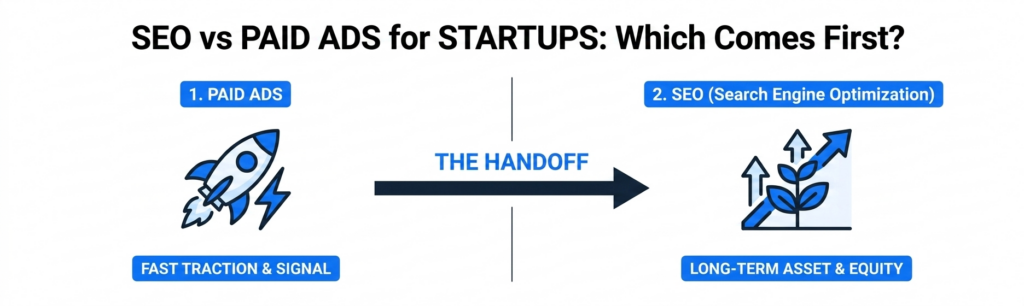
Diagram comparing startup marketing channels, showing paid ads for fast initial traction transitioned into SEO for long-term compound growth.
App Development, Content, CRM, Databases, Digital Marketing, Information, LLM & AI Chatbot, Salesforce, SEO, Technology, Trends, Website Design, Website Development

SEO vs Paid Ads: What Should a Startup Prioritize First?

Every startup founder hits this question around the same time: the first real marketing budget is approved, and now someone has to decide where it goes. SEO or paid ads for startups is one of the most common searches for a reason -both channels promise growth, both cost money you don’t have much of, and picking wrong can burn three to six months you can’t get back. Here’s what you’ll get from this post: a clear breakdown of what each channel actually does for a startup at your stage, the real costs (not just ad spend), and a straight answer on which one to prioritize first based on your specific situation -not a generic “it depends.” Short version: paid ads and SEO solve different problems on different timelines. Most startups need speed before they need efficiency, which changes the calculus more than most agencies admit. The Real Question Isn’t SEO vs Paid Ads -It’s What Stage You’re At Founders often frame this as a permanent choice. It isn’t. The right channel depends on three things: how much runway you have, whether you already have product-market fit, and how competitive your keywords are. A pre-revenue startup validating a new category has a completely different answer than a Series A company with $2M in the bank trying to lower customer acquisition cost. Treating this as one universal rule is where most of the bad advice online comes from. What Paid Ads Actually Get You (And What They Don’t) Paid ads (Google Ads, Meta, LinkedIn) buy you visibility immediately. You launch a campaign on Monday, you have traffic and data by Friday. For a startup still figuring out messaging, that speed is valuable -you’re not just buying clicks, you’re buying market feedback. What paid ads don’t get you: compounding value. The moment you stop paying, traffic stops. There’s no equity building. A [Client name]-style startup spending [$X]/month on Google Ads sees leads dry up within days of pausing the campaign. Paid ads also get expensive fast in competitive categories. CPCs (cost-per-click) for B2B SaaS keywords regularly run $8–$25+, which means a $5,000/month budget might only buy 200–600 clicks before conversion rates even enter the picture. What SEO Actually Gets You (And What It Costs You) SEO builds an asset. Every piece of content, every ranking page, keeps working after you’ve stopped actively paying for it. A well-ranked page from 8 months ago can still be your top lead source today with zero ongoing spend. The cost isn’t cash-heavy, it’s time-heavy. Realistically, most startups won’t see meaningful organic traffic for 4–6 months, and competitive B2B keywords can take 9–12 months to break into page one. If your runway is 6 months, SEO alone is a bad bet -not because it doesn’t work, but because it won’t work fast enough to matter. The Case for Starting With Paid Ads If you’re pre-product-market fit, paid ads should come first. You need fast, cheap signal on what messaging converts, which audience responds, and whether your offer actually resonates -and paid search or social gives you that in weeks, not months. We’d also prioritize paid ads first if you’re entering a brand-new category with low search volume. There’s nothing to rank for yet because nobody’s searching for what you do. Ads let you create demand while SEO waits for demand to exist. The Case for Starting With SEO If your category already has real search volume and you have at least 9–12 months of runway, starting SEO early is the higher-leverage move -every month you wait is a month a competitor could be building rankings you’ll have to out-content later. SEO also wins when your CAC math doesn’t work on paid alone. If your product has a low price point or long sales cycle, and paid CPCs would eat your margin, you need a channel that doesn’t charge per click. Our Take: When to Do Both, and In What Order Most startups don’t actually need to choose -they need a sequence. Our default recommendation for a funded startup with 12+ months of runway: run paid ads for the first 60–90 days to validate messaging and get quick wins for the board or investors, while SEO work starts in the background (technical setup, keyword research, first content batch). By month 4–6, as SEO traffic starts contributing, you can start dialing back paid spend on your highest-CPC keywords and let organic take over -often cutting blended CAC by 20–40% over the following two quarters. This isn’t a neutral “do both equally” cop-out. It’s a specific order, and the order matters more than the split. A Quick Framework: 3 Questions to Decide Where to Start The Bottom Line There’s no universal winner between SEO and paid ads for startups -there’s a right sequence based on your runway, your category, and how fast you need signal. Get the order wrong and you either burn cash chasing rankings you can’t afford to wait for, or you bleed budget on ads with no long-term asset to show for it. Not sure where your startup should start? Get a free SEO audit from Nuclay and we’ll tell you exactly where the fastest wins are -and where paid spend is currently propping up gaps SEO should be filling. SEO or Paid Ads: Which First? Stop burning cash on the wrong sequence. Get a free SEO audit from Nuclay to find fast organic wins and stop ad waste. Claim Free Audit

A horizontal graphic with a vertical dividing line. The left side, under a 'FULL-SERVICE' label, shows a cluttered group of diverse marketing icons with a question mark. The right side, labeled 'SPECIFIC ACCOUNT TEAM,' shows a single, focused professional icon with a name badge and checkmarks, visualizing accountability over outsourcing.
App Development, Content, CRM, Databases, Digital Marketing, Information, LLM & AI Chatbot, Salesforce, SEO, Technology, Trends, Website Design, Website Development

Best Digital Marketing Agency in Gurugram: What to Actually Look For

Type “best digital marketing agency in Gurugram” into Google and you’ll get a dozen lists, all ranking the same 10 agencies in a slightly different order, none explaining why. That’s not useful when you’re about to hand someone your marketing budget and your brand. The real question isn’t “who’s ranked #1” – rankings like that are usually paid placements or SEO games anyway. The real question is: what should you actually be checking before you sign a contract? This guide breaks down the criteria that matter, the red flags that don’t get talked about enough, and the questions worth asking on a first call. Gurugram’s agency market is crowded – from large multi-service shops to two-person freelance setups calling themselves an “agency.” Here’s how to tell them apart. Do They Specialize, or Do They Offer Everything to Everyone? An agency that lists 15 services on its homepage – SEO, PPC, social, branding, web dev, PR, video, influencer marketing – isn’t necessarily bad, but it’s worth asking who actually does the work. A lot of “full-service” agencies in Gurugram outsource half their services to freelancers or subcontractors once you sign, which means less accountability and more variance in quality. What to ask: “Who on your team will actually work on my account, and what’s their background?” A good agency answers this specifically – with names, roles, and relevant experience. A vague answer (“our expert team”) is a sign the work may be outsourced. Can They Show Results in Your Industry – Not Just Any Results Case studies matter, but the wrong case study can be misleading. An agency that’s only ever run campaigns for D2C fashion brands may not know how to generate B2B leads for a manufacturing company, even if their portfolio looks impressive. Look for: If an agency can’t point to a specific, numbers-backed result, that’s worth noting – not disqualifying on its own, but worth factoring in. How Do They Report Results, and How Often? This is where a lot of client relationships in Gurugram’s agency scene quietly fall apart. Reporting once a month with a generic PDF full of vanity metrics (impressions, likes, reach) isn’t the same as reporting that ties activity to actual business outcomes – leads, calls, revenue. Our take: if an agency can’t clearly explain, before you’ve even signed, how they’ll report ROI – not just activity – that’s a real problem. Reach and impressions are easy to inflate. Leads and revenue aren’t. Ask to see a sample report from an existing client (with names redacted). It tells you more about how an agency operates than any pitch deck will. Do They Understand Your Local Market, or Are You Just Another Account? Gurugram businesses often compete in a mix of hyperlocal (a nearby competitor) and national markets (an e-commerce brand with no physical presence). An agency that treats every client the same – same keyword strategy, same ad templates, same generic local SEO checklist – usually isn’t digging into what actually makes your specific market different. For a Gurugram-based business, this might mean: What Happens If It Doesn’t Work? Contracts matter more than pitches. Before signing, get clear answers on: A confident agency will answer all of this directly, in writing, before you sign anything. The Bottom Line Choosing a digital marketing agency in Gurugram isn’t about finding whoever’s ranked “best” on a listicle – it’s about finding a team that specializes in your kind of business, reports on real numbers, and is upfront about contracts and ownership. Ask the questions above before you sign anything. Want a straight answer on whether we’re the right fit for your business ? Contact us – we’ll tell you honestly, even if that answer is no. Want Real Growth Instead of Vanity Metrics? Get an honest assessment of your digital strategy. Talk to the Nuclay team today to see if we’re the right fit for your business. Book a Call Now

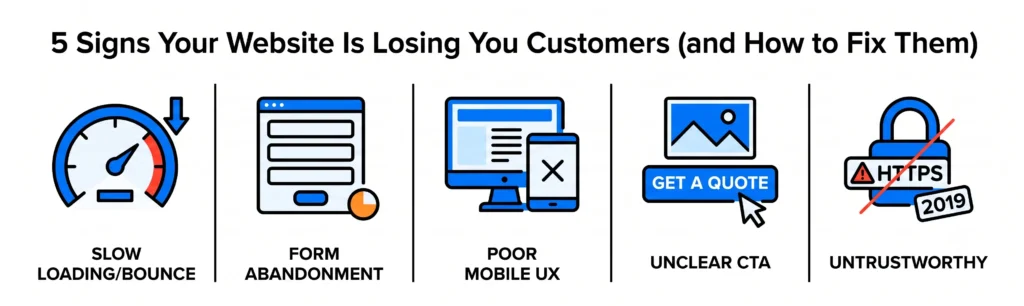
Infographic titled "5 Signs Your Website Is Losing You Customers (and How to Fix Them)" summarizing five icons in a row: slow loading and high bounce rate, form abandonment, poor mobile UX, unclear call-to-action, and untrustworthy design signals like missing HTTPS and outdated 2019 copyright.
App Development, Content, CRM, Databases, Digital Marketing, Information, LLM & AI Chatbot, Salesforce, SEO, Technology, Trends, Website Design, Website Development

5 Signs Your Website Is Losing You Customers (and How to Fix Them)

Most business owners find out their website is a problem the hard way – a customer mentions it in passing, or worse, they just quietly go to a competitor instead. There’s no alert that pops up saying “you lost a sale because your site took 6 seconds to load.” It just happens, over and over, until someone finally digs into the numbers. Here’s the uncomfortable truth: a website doesn’t have to be broken to be losing you money. It just has to be slow, confusing, or untrustworthy enough that visitors leave before they buy, call, or fill out a form. This post walks through five specific signs your website is actively pushing customers away – and what to do about each one. If even one of these sounds familiar, it’s worth a closer look. We’ll show you what to check and how to fix it. 1. Your Bounce Rate Is High and Your Session Time Is Low If visitors are leaving within seconds of landing on your site, that’s not a traffic problem – it’s a trust problem. Google Analytics (or GA4, if you’ve made the switch) will show you this in the Engagement report. A bounce rate above 55-60% for a homepage or service page is usually a red flag, especially if average engagement time is under 30 seconds. What’s usually causing it: The fix: Run your site through Google PageSpeed Insights. If your mobile score is under 50, that’s likely your biggest lever. Also do a “5-second test” – show your homepage to someone unfamiliar with your business and ask what you do. If they hesitate, your messaging needs work before anything else. 2. Your Contact Forms Get Started but Not Finished This one’s sneaky because it looks like interest, not loss. Someone lands on your contact page, starts typing – and disappears. Tools like Hotjar or Microsoft Clarity (both have free tiers) show form abandonment through session recordings, and it’s often more common than business owners expect. Common culprits: Our take: most businesses over-ask on forms. A contact or quote form should collect the minimum needed to start a conversation – name, email, and one qualifying question. You can always get the rest on a call. 3. Your Site Isn’t Built for the Device Most People Are Using We mentioned mobile above, but it deserves its own point because it’s this common: [X%] of small business websites we’ve audited still have some version of a broken mobile experience – overlapping text, buttons too small to tap, or a checkout/contact flow that requires pinch-zooming to complete. If your analytics show mobile traffic converting at a fraction of your desktop rate, that’s not a coincidence – it’s usually a UX gap. Google also uses mobile-first indexing, meaning it primarily crawls and ranks the mobile version of your site. A weak mobile experience doesn’t just lose customers directly; it can quietly hurt your search rankings too. 4. There’s Nothing on the Page Telling Visitors What to Do Next A website without a clear call-to-action is like a store with no cash register – people can browse, but nothing tells them how to actually buy. This is one of the most common issues we see, and one of the cheapest to fix. Every key page – homepage, service pages, blog posts – should have one obvious next step. Not five competing buttons, not a link buried in the footer. One clear action: “Get a Free Quote,” “Book a Call,” “Start Your Order.” Quick test: open your homepage and see if you can find the primary CTA in under 3 seconds without scrolling. If you can’t, neither can your visitors. 5. Your Site Doesn’t Look (or Feel) Trustworthy This is harder to quantify but just as real. Outdated design, broken images, a copyright date from 2019, no visible reviews or client logos, a “https” warning in the browser – any of these can make a visitor bail before they’ve even read your offer, especially for higher-ticket purchases where trust matters more. Signals that build trust fast: If your site hasn’t been touched in a couple of years, it’s worth asking: would you buy from this business, looking at it with fresh eyes? The Bottom Line None of these five issues require a total overhaul to fix – most come down to speed, clarity, and trust. But they’re also easy to miss when you’re looking at your own site every day. The fastest way to find out where you stand is to have someone else look at it with fresh eyes. Want to know exactly where your website is losing customers? Get a free website audit from Nuclay – we’ll show you specific, actionable issues, not a generic checklist. Want to Know Where Your Website Is Losing Customers? Get a free website audit from Nuclay for specific, actionable fixes. Get Your Free Audit Now

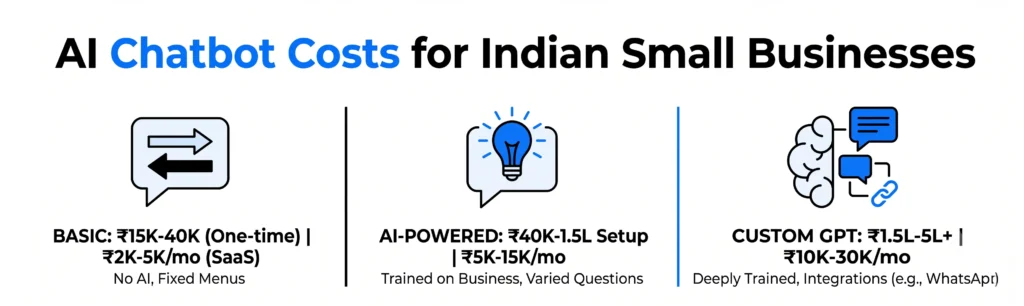
Infographic titled "AI Chatbot Costs for Indian Small Businesses" comparing three chatbot types: Basic rule-based chatbot with fixed menus and no AI priced at ₹15K-40K one-time or ₹2K-5K per month; AI-powered chatbot trained on business-specific varied questions priced at ₹40K-1.5L setup plus ₹5K-15K per month; and Custom GPT chatbot with deep training and integrations like WhatsApp priced at ₹1.5L-5L+ setup plus ₹10K-30K per month.
App Development, Content, CRM, Databases, Digital Marketing, Information, LLM & AI Chatbot, Salesforce, SEO, Technology, Trends, Website Design, Website Development

How Much Does an AI Chatbot Cost for a Small Business in India?

“How much does an AI chatbot cost?” is one of those questions where every website gives you a different answer – because every website is selling a different thing. Free chatbot builders exist. So do custom setups running into lakhs. Neither number is wrong; they’re just answers to different questions. This post breaks down what actually drives AI chatbot pricing for small businesses in India in 2026 – from basic rule-based bots to custom GPT-powered assistants – so you know what you should be paying for what you actually need, not what a sales page wants you to think you need. By the end, you’ll have real price ranges by chatbot type, the factors that push costs up or down, and a clear sense of what a fair quote looks like for your business. The Short Answer: Price Ranges by Chatbot Type Before the “it depends” section (there’s always one), here’s the range: Most small businesses land in the middle tier. A basic chatbot is often too limited to be useful, and a fully custom enterprise build is usually overkill unless you’re handling high volume or complex workflows. Why the Range Is So Wide The gap between ₹15,000 and ₹5,00,000 isn’t agencies padding invoices – it reflects genuinely different products. Here’s what actually moves the number. What the Bot Needs to Understand A chatbot that answers “What are your store hours?” is a different build from one that can handle “I ordered the blue one but got sent the red one, can you check my order and process a replacement?” The second requires the bot to understand context, pull data from your systems, and make decisions – not just match keywords to pre-written answers. Where It Needs to Live A chatbot that only lives on your website is simpler and cheaper to build than one that works across WhatsApp, Instagram DMs, and your website simultaneously with a consistent memory of the conversation. Most Indian small businesses want WhatsApp integration specifically, since that’s where their customers already are – and that adds cost because of WhatsApp Business API fees and setup complexity. What It Needs to Connect To A chatbot that just answers FAQs doesn’t need to talk to anything else. A chatbot that checks order status, books appointments, or updates a CRM needs to be connected to those systems. Every integration – Shopify, Zoho, Salesforce, a custom booking system – adds development time and, usually, ongoing API costs. Who’s Building It A freelancer or no-code platform (like a basic Tidio or WATI setup) will always be cheaper than an agency building a custom solution. That’s a fair tradeoff if your needs are simple. It becomes a problem when a business tries to force a no-code tool to do something it wasn’t built for, then spends more fixing workarounds than a proper build would have cost. The Hidden Costs Most Quotes Don’t Mention A cheap upfront quote can turn into an expensive year if these aren’t factored in: We’ve seen businesses get quoted [₹50,000] for a chatbot, only to find WhatsApp fees and model costs added another [₹8,000-₹12,000/month] they weren’t told about upfront. Ask for the full monthly cost, not just the build price. What a Fair Quote Actually Looks Like A trustworthy quote should break down, at minimum: If a quote is a single flat number with no breakdown, ask why. Either it’s a very basic bot, or important ongoing costs are being left out. Get a Number Specific to Your Business Every range in this post is a starting point, not a quote – your actual cost depends on your channels, integrations, and conversation complexity. The fastest way to know your real number is to talk to someone who’ll ask about your business before naming a price. Get a custom quote from Nuclay’s CustomGPT team and find out exactly what a chatbot built for your business would cost – no generic packages, no hidden WhatsApp fees sprung on you later. Get a Number Specific to Your Business Get a custom quote from Nuclay’s CustomGPT team and find out exactly what a chatbot built for your business would cost, no generic packages, no hidden WhatsApp fees. Get Your Custom Quote

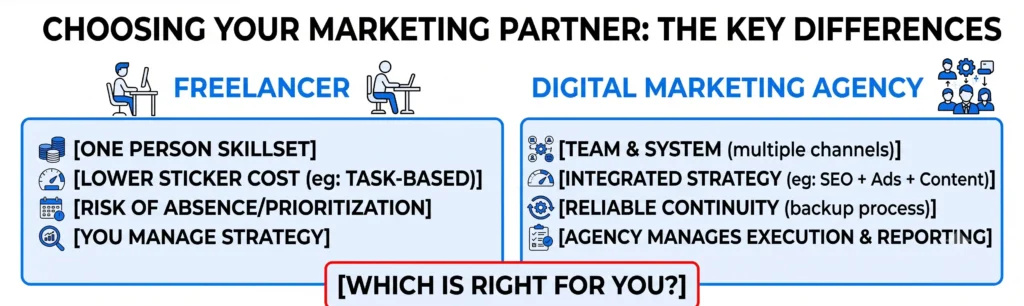
Infographic titled "Choosing Your Marketing Partner: The Key Differences" comparing a freelancer versus a digital marketing agency. Freelancer column lists: one-person skillset, lower sticker cost for task-based work, risk of absence or prioritization issues, and you manage strategy. Digital marketing agency column lists: team and system across multiple channels, integrated strategy combining SEO, ads, and content, reliable continuity with a backup process, and the agency manages execution and reporting. Bottom banner asks "Which is right for you?"
App Development, Content, CRM, Databases, Digital Marketing, Information, LLM & AI Chatbot, Salesforce, SEO, Technology, Trends, Website Design, Website Development

Digital Marketing Agency vs Freelancer: Which Should Your Business Choose?

You’ve got a budget, a goal (more leads, more sales, more visibility), and two very different ways to spend that money. A freelancer looks cheaper and more flexible. An agency looks more expensive and more “corporate.” Neither answer is automatically right – it depends on what you’re actually trying to fix. This isn’t a “why agencies are better” pitch dressed up as a comparison. Freelancers are the right call in specific situations. Agencies are the right call in others. By the end of this post, you’ll know exactly which one fits your business right now, based on scope, speed, risk, and what happens when things go sideways – because something always does. What You’re Actually Comparing A freelancer is one person. An agency is a team, a process, and (usually) a set of tools and systems built from managing dozens of accounts. That difference sounds obvious, but it’s the root of almost every other tradeoff on this list. When you hire a freelancer, you’re betting on one person’s skillset, bandwidth, and availability. When you hire an agency, you’re buying into a system that’s designed to keep working even if one person is out sick, on vacation, or moves on to a new job. Neither structure is inherently better. A talented freelancer with 8 years of experience can easily outperform a junior in-house team at a mediocre agency. But structurally, they solve different problems. Cost: The Real Numbers, Not the Sticker Price Freelancers typically charge less per hour – often [$25-$75/hr] for a marketing freelancer, versus an agency retainer that might start around [$2,500-$5,000/month] for a small business package. On paper, freelancers win. But the sticker price hides the real cost comparison: If you only need one specific task done – say, optimizing a single landing page – a freelancer is almost always the cheaper, faster option. If you need an integrated strategy across SEO, paid, content, and email working together, stitching that together with 3-4 freelancers usually ends up costing more in time and coordination than one agency retainer. Speed and Availability A good freelancer can move fast – sometimes faster than an agency, because there’s no internal handoff between strategist, writer, and designer. If you need a single campaign turned around in 48 hours, a freelancer with the right availability can often beat an agency’s process. The tradeoff shows up when that freelancer gets sick, takes a two-week vacation, or picks up a bigger client and quietly deprioritizes you. There’s no backup. Your campaign pauses when they pause. Agencies are built to absorb that risk. At [Nuclay], for example, client work is never tied to a single person – if your account manager is out, someone else already knows the account and can step in without missing a deadline. Scope: What Are You Actually Trying to Get Done? This is the real deciding question, more than budget. Choose a freelancer if: Choose an agency if: A common mistake: hiring a freelancer for a job that actually needs a team, then getting frustrated when results stall because one person can’t realistically run SEO, paid ads, email, and analytics at the same level a specialized team can. Accountability: What Happens When Results Slip? This is the part most comparison posts skip, and it’s often the deciding factor. With a freelancer, if performance drops, you’re troubleshooting with one person – and if that relationship sours, you’re back to square one, rehiring and onboarding someone new from scratch. With an established agency, there’s typically a account structure, reporting cadence, and escalation path already built in. If a strategy isn’t working, there’s a team diagnosing why, not just one person hoping the next campaign performs better. Neither guarantees results. But agencies generally have more built-in process to catch problems early, simply because more eyes are on the account. When a Freelancer Is Genuinely the Smarter Choice To be direct: if you’re a solo founder or small team with a tight budget and one clear, contained task, a freelancer is often the smarter first move. Don’t let anyone (including an agency) convince you that you need a six-month retainer to get a landing page redesigned or a one-off email sequence written. The mistake is treating a freelancer as a full replacement for an integrated marketing strategy when your business has actually outgrown that scope. Which One Should You Actually Choose? If your need is narrow, temporary, or you already have marketing direction in-house, a freelancer is a smart, cost-effective choice. If you need multiple channels working together, reliable delivery, and a team that catches problems before they tank your results, an agency is worth the higher price tag. Not sure which side of that line your business falls on? Book a free consult with Nuclay and we’ll give you a straight answer – even if that answer is “you don’t need us yet.” Freelancer or Agency: Which One Do You Need? Not sure which side your business falls on? Book a free consult with Nuclay and we’ll give you a straight answer, even if it’s “you don’t need us yet.” Book Your Free Consult

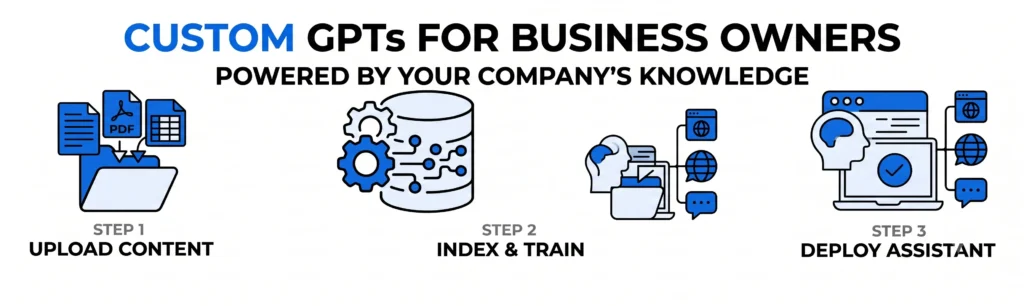
Infographic titled "Custom GPTs for Business Owners, Powered by Your Company's Knowledge" showing a three-step workflow: Step 1 Upload Content (PDFs, documents, spreadsheets into a folder), Step 2 Index & Train (gears processing data into a knowledge database), Step 3 Deploy Assistant (AI brain icon connected to website, chat, and messaging channels).
App Development, Content, CRM, Databases, Digital Marketing, Information, LLM & AI Chatbot, Salesforce, SEO, Technology, Trends, Website Design, Website Development

What Is CustomGPT? A Simple Guide for Business Owners

If you’ve heard the term “CustomGPT” thrown around and assumed it’s just ChatGPT with a different logo, you’re not alone – and you’re not entirely wrong, but you’re missing the important part. A CustomGPT is an AI assistant trained specifically on your business information, so it can answer questions, handle support tickets, or guide customers using facts about your company instead of generic internet knowledge. That distinction matters more than it sounds like it should. A regular chatbot might tell a customer something plausible but wrong. A CustomGPT tells them what’s actually true about your return policy, your product specs, or your pricing tiers – because it was built on those exact documents. This guide breaks down what a CustomGPT actually is, how it works under the hood (without the engineering jargon), and how to tell if your business is a good fit for one. What Does “CustomGPT” Actually Mean? “GPT” stands for Generative Pre-trained Transformer – the underlying technology behind tools like ChatGPT. “Custom” means the AI has been fed your specific content: your website, your FAQ pages, your internal wikis, your product manuals, even your past support tickets. The result is an assistant that speaks with your company’s voice and knows your company’s facts, rather than a general-purpose bot pulling from the entire internet. Ask a stock ChatGPT about your refund window and it’ll guess or refuse. Ask a CustomGPT and it’ll tell you exactly what your policy says, because it was trained on the policy itself. How Does a CustomGPT Actually Work? At a basic level, three things happen: Here’s a concrete example: a mid-sized SaaS company with a 40-page product documentation site can turn that entire site into a CustomGPT in roughly a week. Instead of customers digging through docs, they type a question and get a direct answer, sourced from the actual documentation, in seconds. What Can a CustomGPT Do for Your Business? This is where most of the confusion clears up, because the use cases are pretty concrete: One agency client used a CustomGPT trained on their onboarding documentation and cut new-employee ramp-up questions to their HR team by [X%] within the first month. That’s not a hypothetical – that’s the kind of measurable time savings this technology is built for. CustomGPT vs. a Generic Chatbot: What’s the Real Difference? We’ll be blunt: most “chatbots” businesses installed five years ago are decision trees. Click a button, get a scripted response, hit a dead end if your question isn’t on the list. They’re not really AI – they’re glorified FAQ menus. A CustomGPT actually understands the question you’re asking, even if you phrase it in a way the business never anticipated. That’s the entire point of using a language model instead of a rules-based bot. If your current chatbot frustrates customers because it can’t handle anything outside a rigid script, that’s a sign you’ve outgrown it – not a sign that AI assistants don’t work. Who Actually Needs One? Not every business does, and we’d rather tell you that upfront than sell you something you don’t need. A CustomGPT makes the most sense when: If you’re a five-person business answering a dozen emails a week, a CustomGPT is overkill –  a well-written FAQ page will do the job. If you’re fielding hundreds of repetitive questions a month across support, sales, or internal teams, the math starts to favor automation fast. What It Costs and Takes to Build One Timelines and budgets vary depending on how much content you’re working with and how deeply the assistant needs to integrate with your existing tools (CRM, help desk, website). A straightforward version – trained on existing documentation and embedded on a website –  can often be live within a few weeks. More complex builds, like ones that pull live data from a CRM or trigger workflows, take longer and cost more. The honest answer is: it depends on your setup, and any agency that gives you a firm number before looking at your actual content and systems is guessing. The Bottom Line A CustomGPT isn’t a buzzword – it’s a practical tool for businesses drowning in repetitive questions, whether those questions come from customers, sales prospects, or your own employees. The technology is accessible enough now that it’s not just a Fortune 500 play anymore. If you’re curious whether a CustomGPT fits your business, take a look at our CustomGPT service page to see how we approach building one –  no obligation, just a clearer picture of what it could look like for you. Tired of Answering the Same Questions? Stop losing hours to repetitive support tickets and FAQs.Build a CustomGPT that knows your exact business policies. Explore CustomGPT Setup Build the future with Nuclay Solutions. @media (max-width: 480px) { .nuclay-rag-cta { padding: 35px 15px !important; width: 95% !important; } }

A horizontal banner showing a three-part minimal vector graphic that illustrates how AI simplifies business analytics by converting charts into text insights, filtering for revenue drivers, and suggesting direct business solutions using a clean white background and blue brand colors.
App Development, Content, CRM, Databases, Digital Marketing, Information, LLM & AI Chatbot, Salesforce, SEO, Technology, Trends, Website Design, Website Development

AI for Small Business Analytics: How to Read Simple Numbers Without Confusion

You don’t need a degree in data science to understand if your website is actually helping your business grow. Most small business owners get overwhelmed when they open an analytics dashboard. They are immediately hit with complex terms like “bounce rates,” “session durations,” and confusing graphs that look like a stock market ticker. When metrics are too complicated, it is easy to stop looking at them entirely and just guess whether your digital marketing is working. Simple AI tools remove this confusion. By translating raw data into everyday business insights, AI allows you to read your website’s performance numbers easily, helping you make smart decisions without the headache. 1. Turning Complicated Charts Into Plain Text Summaries Looking at a graph with five different colored lines can make it incredibly difficult to spot what is actually working and what isn’t. 2. Filtering Out the “Noise” to Focus on What Matters Not all website numbers are important. For example, a sudden spike in page views sounds great, but if those visitors are random bots or people from outside your service area who will never buy from you, that number doesn’t matter. 3. Getting Simple Action Steps, Not Just More Data The most frustrating part of standard data dashboards is that they tell you what happened, but they never tell you what to do next to fix a drop or improve a win. The Outcome: Running Your Business on Facts, Not Guesses Data shouldn’t be a puzzle you have to solve every week. By letting simple AI tools summarize your traffic charts, filter out the noise, and provide clear action steps, you turn your website metrics into an easy-to-use guide for your business. You get all the benefits of data-driven decisions without any of the confusion. At Nuclay Solutions, we build clean, simple dashboards directly into our clients’ websites. We help you cut through the technical clutter so you can clearly see what drives your growth and where to focus your energy next. Stop Guessing Your Website Performance Get a clear direction for growth. Connect with Nuclay to turn confusing traffic numbers into simple, revenue-driven insights. Simplify Your Analytics

Services

Get in touch

Gurugram Office

Dehradun Office

Scroll to Top