Branding Mistakes - Your One Stop Digital Solution

Branding Mistakes

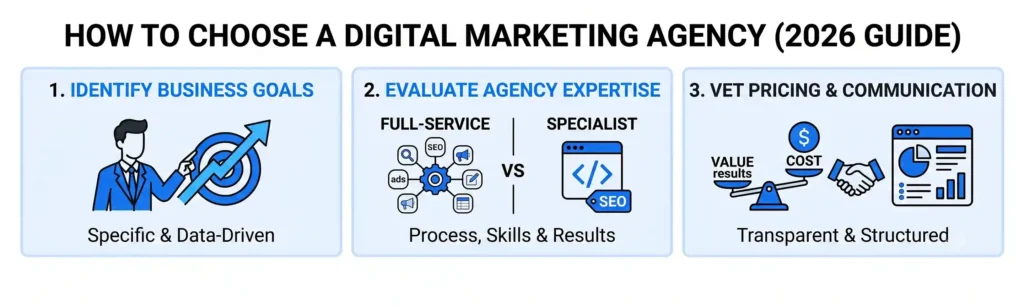
Infographic outlining 3 steps to choose a digital marketing agency: identifying goals, evaluating expertise, and vetting pricing and communication.
App Development, Content, CRM, Databases, Digital Marketing, Information, LLM & AI Chatbot, Salesforce, SEO, Technology, Trends, Website Design, Website Development

How to Choose the Right Digital Marketing Agency for Your Business

Most businesses don’t fire their marketing agency because the agency was incompetent. They fire them because nobody asked the right questions before signing the contract. We’ve had more discovery calls than we can count with business owners who left their last agency because of vague reporting, missed deadlines, or a strategy that never matched their actual goals. Choosing a digital marketing agency isn’t about finding the one with the flashiest case studies – it’s about finding the one whose process, pricing, and communication style actually fit how your business operates. This guide walks through what to actually evaluate, the questions most people forget to ask, and the warning signs that show up before you’ve signed anything. Start With What You’re Actually Trying to Fix Before you look at a single agency, get specific about the problem. “We need more marketing” isn’t a brief – it’s a shrug. Are leads not converting? Is traffic flat? Is your brand invisible against competitors who spend less than you? The reason this matters: agencies specialize, whether they admit it or not. A shop built around paid ads will often push paid ads as the answer to a branding problem. A firm that lives in SEO will stretch a six-month content plan onto a business that needed a faster fix. Write down your actual goal in a sentence – “increase qualified leads from our website by [X%] in six months” is a brief. “Grow our business” is not. You’ll use this sentence to test every agency you talk to. Full-Service vs. Specialist: Pick Based on Complexity, Not Prestige There’s a persistent idea that full-service agencies are somehow less focused than specialists. In our experience, that’s backwards for most small and mid-sized businesses. If your marketing touches SEO, paid ads, your website, and your CRM – and for most businesses it does – hiring four specialists means four teams that don’t talk to each other, four invoices, and you playing project manager between them. A full-service agency (one team handling strategy, execution, and the tech underneath it) removes that coordination tax entirely. Specialists make sense in a narrower case: you have an internal marketing team that needs one specific gap filled, like conversion rate optimization or paid social. If that’s you, hire a specialist. If you’re building marketing from scratch or your current approach is scattered across vendors, a full-service partner will move faster and cost less in wasted hours than stitching together freelancers. Ask to See Actual Work, Not Just Results Case studies are marketing. Ask any agency you’re seriously considering to walk you through one real project, live, on the call – not a slide with a client name and a big percentage. Push for specifics: An agency that can talk through a real failure and what they changed is more trustworthy than one that only has wins. Every agency has had a campaign underperform. The ones worth hiring can explain what they learned from it without getting defensive. A Quick Gut Check: Ask About Their Own Marketing If a digital marketing agency can’t show you how they market themselves – their own SEO rankings, their own content, their own lead flow – be skeptical. It’s a reasonable proxy for whether they actually practice what they’re selling you. Pricing Models: Understand What You’re Actually Buying Agencies typically price one of three ways, and each comes with a trade-off: None of these is inherently better. The mistake is not asking which model you’re being quoted and matching it to what you actually need. A retainer for a business that needs one project done is overpaying. Performance pricing for a business that needs brand-building, which takes months to show measurable results, sets everyone up to be frustrated. Communication and Reporting: Set the Standard Before You Sign The single biggest driver of agency breakups isn’t results – it’s silence. Ask before signing: If an agency can’t produce a sample report on the spot, that’s a preview of what working with them will feel like. You want numbers tied to your actual goal from Step 1 – not vanity metrics like “impressions” dressed up as wins. Red Flags Worth Walking Away From A few patterns show up again and again with agencies that don’t work out: The Bottom Line The right digital marketing agency isn’t the one with the biggest client logos on their homepage – it’s the one that can clearly explain your problem back to you, show real work instead of highlight reels, and commit to reporting you’ll actually understand. If you’re evaluating agencies right now and want a second opinion on a proposal you’ve already received – or just want to talk through what your business actually needs – book a free consult with our team. We’ll tell you honestly whether we’re the right fit, even if that means pointing you elsewhere. Need a Second Opinion on Your Agency Pitch? Get an honest proposal review or strategy chat. No pressure, no pitch. Book Free Consultation → Frequently Asked Questions (FAQ)
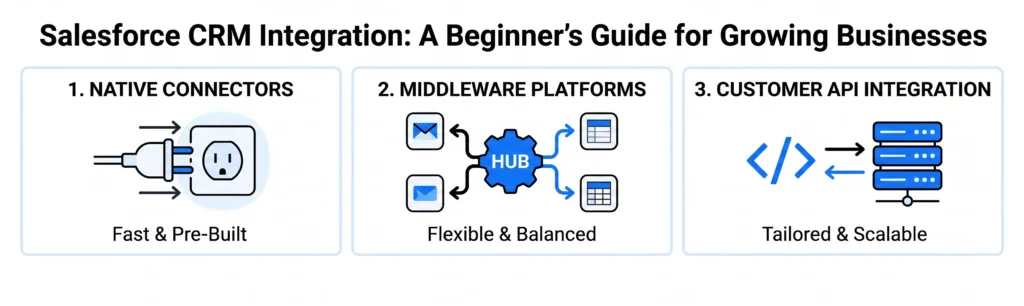
Minimalist diagram showing three main Salesforce integration methods: Native Connectors (fast & pre-built), Middleware Platforms (flexible & balanced), and Custom API Integration (tailored & scalable).
App Development, Content, CRM, Databases, Digital Marketing, Information, LLM & AI Chatbot, Salesforce, SEO, Technology, Trends, Website Design, Website Development

Salesforce CRM Integration: A Beginner’s Guide for Growing Businesses

At some point, every growing business hits the same wall: your sales team is in Salesforce, your marketing team is in a separate email tool, your support team is in a helpdesk platform, and your finance team is still exporting spreadsheets. Nobody has the full picture of a customer, and everyone’s working off slightly different data. That’s the problem Salesforce CRM integration solves. Done right, it connects Salesforce to the other tools your business already runs on – your email platform, your accounting software, your website, your support desk – so information flows between them automatically instead of getting copied and pasted by hand. This guide covers what Salesforce integration actually means, how it works, what it typically costs, the mistakes that derail most first-time integrations, and how to know if your business is ready for it. If you’re evaluating this for the first time, this should give you enough to have an informed conversation with whoever ends up building it. What Does “Salesforce Integration” Actually Mean? Integration means connecting Salesforce to another piece of software so the two can share data without manual entry. That’s it – the term sounds more technical than the concept actually is. For example: when a customer fills out a form on your website, an integration can automatically create a lead in Salesforce, tag it with the right source, and notify the right sales rep – all within seconds, with zero manual work. Common integrations we build for growing businesses include: How Does the Integration Actually Work? Most Salesforce integrations use one of three methods, and the right one depends on your tools and budget. Native or AppExchange Connectors Many popular tools have pre-built Salesforce connectors available through Salesforce’s AppExchange marketplace. These are the fastest and cheapest option – often a few hours of setup instead of weeks – but they only work if your specific tools have a connector built already, and customization is limited. Middleware Platforms Tools like Zapier, Make, or MuleSoft sit between Salesforce and your other software, moving data back and forth based on rules you set. This is the middle ground: more flexible than native connectors, less expensive than custom development, and a good fit for most small-to-midsize businesses with a handful of tools to connect. Custom API Integration For complex workflows or tools without existing connectors, integration happens through Salesforce’s API directly – custom code built specifically for your systems. This is the most powerful and flexible option but also the most expensive, and it’s typically only necessary once a business has outgrown what middleware can handle. Our take: most businesses jump straight to custom development because it sounds more “proper,” but middleware handles 80% of real-world use cases at a fraction of the cost. Start there unless you have a specific technical reason not to. What Does Salesforce Integration Cost? This varies significantly based on complexity, but here’s a rough range based on the three approaches above: The bigger cost driver isn’t usually the connection itself – it’s data cleanup beforehand. Businesses that have years of duplicate contacts, inconsistent naming, and dead leads sitting in their CRM often need to clean that data before integration, or they just end up automating the mess. 5 Mistakes That Derail Salesforce Integrations 1. Integrating before cleaning your data. Bad data in equals bad data everywhere, faster. Clean up duplicates and standardize fields before you connect anything. 2. Trying to sync everything at once. The businesses that succeed start with one high-value integration – usually lead capture or invoicing – prove it works, then expand. Trying to connect five systems simultaneously multiplies the chances something breaks silently. 3. Skipping field mapping planning. If “Company Name” in your marketing tool doesn’t match “Account Name” in Salesforce, data either fails to sync or lands in the wrong place. This should be mapped out before any technical work starts, not discovered during testing. 4. No one owns it after launch. Integrations aren’t “set and forget.” APIs change, tools get updated, new fields get added. Without someone responsible for monitoring it, small breaks go unnoticed for months. 5. Underestimating user permissions and security. Not everyone in Salesforce should see everything flowing in from other systems. Getting permission structures wrong is a common – and avoidable – source of both security risk and internal confusion. How Do You Know If You’re Ready for Salesforce Integration? A few signs your business has outgrown manual data entry: If two or more of these sound familiar, integration will likely pay for itself in reclaimed hours within the first few months. The Bottom Line Salesforce integration isn’t about connecting every tool you own – it’s about closing the specific gaps costing your team time and your customers a good experience. The businesses that get the most value start narrow, get one integration right, and build from there. If you’re not sure where to start or which approach fits your setup, talk to our CRM team – we’ll walk through your current tools and tell you honestly what needs to be connected first, and what can wait. Is Siloed Data Slowing Your Growth? Stop wasting hours copying data across tools. Talk to the Nuclay CRM team to connect your stack and automate your workflows. Build Your CRM Strategy Frequently Asked Questions (FAQ)

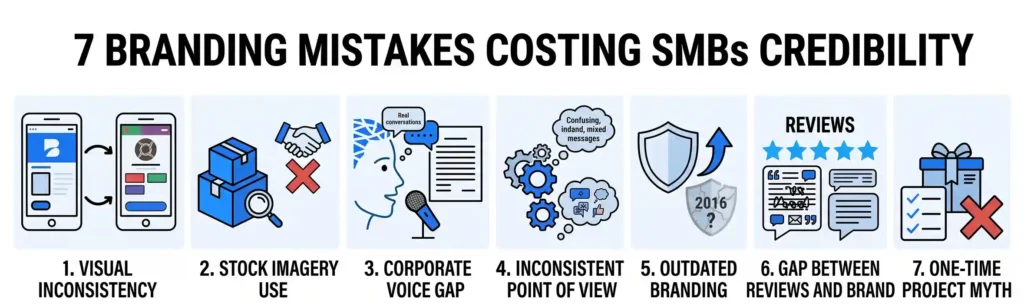
Minimalist infographic highlighting seven SMB branding mistakes including visual inconsistency, stock photo reliance, generic corporate tone, outdated design, and review discrepancies using blue and white vector icons.
App Development, Content, CRM, Databases, Digital Marketing, Information, LLM & AI Chatbot, Salesforce, SEO, Technology, Trends, Website Design, Website Development

7 Branding Mistakes That Are Quietly Costing SMBs Credibility

Most small business owners don’t think they have a branding problem. They have a logo, a color palette, maybe a tagline someone wrote in a rush three years ago. Branding feels handled. But credibility doesn’t fall apart from one big mistake – it erodes from a dozen small ones a customer notices in the first ten seconds on your site or Instagram page. A mismatched font here, an outdated photo there, a tone that doesn’t match who you actually are. None of it screams “unprofessional” on its own. Together, it adds up to a business that feels harder to trust than it should. This post breaks down the seven branding mistakes we see most often in small and mid-sized businesses – the kind that quietly push potential customers toward a competitor without you ever knowing why. If you recognize your business in more than two of these, it’s worth a closer look. 1. Your Visuals Don’t Match Across Platforms If your Instagram looks like a different company than your website, that’s a problem. Customers now bounce between 3-5 touchpoints before they buy – your site, your socials, Google Business Profile, maybe an email – and inconsistency between them reads as either sloppiness or a scam. A [furniture retailer we audited] had a clean, modern logo on their website but was still using a clip-art version on their delivery vans and Facebook page. Customers assumed the two were unrelated businesses. Fix: Pick one logo file, one color palette, one font pairing. Use them everywhere – no exceptions, no “just for now” workarounds. 2. You’re Writing Like a Corporation, Not a Person Small businesses have an advantage big brands can’t buy: a real, specific voice. Most throw it away by writing copy that sounds like it came from a legal department – “We are committed to delivering excellence in customer service.” Nobody talks like that, and nobody trusts a business that does. Generic language signals generic quality, even when the actual product or service is excellent. Fix: Write the way you’d talk to a customer standing in front of you. If a sentence could appear on any competitor’s site with the name swapped out, rewrite it. 3. Your Photos Look Like Stock Photos (Or Are Stock Photos) Actual stock photos of people shaking hands in a bright office are an instant credibility hit – customers can spot them immediately, and it tells them you didn’t invest in showing your real business. Even original photos taken on an old phone with bad lighting create a similar effect. This matters more for service businesses than most owners realize. A landscaper with real before/after photos of actual jobs will out-convert a competitor with a polished stock photo of a green lawn, every time. Fix: Budget for a half-day photoshoot of your real team, real space, real product. It costs less than one bad month of ad spend and it pays back for years. 4. You Don’t Have a Consistent Point of View Businesses that stand for something specific are easier to trust than businesses that try to appeal to everyone. If your messaging is a vague list of “quality, service, and value” – the same three words every competitor in your category uses – customers have no reason to remember you. Fix: Pick a genuine point of view about how you do things differently, even a small one, and say it clearly. “We only use local suppliers” or “we don’t upsell – flat pricing, always” gives people something concrete to trust. 5. Your Branding Hasn’t Been Updated Since Launch A logo or website that looked current in 2016 now signals the opposite of what you want: that the business might be stagnant, outdated, or not actively run. Design trends shift, and customers register that shift even if they can’t articulate why something “feels old.” Fix: You don’t need a full rebrand every year. But a five-year-old visual identity should get an honest review – small refreshes (updated fonts, a cleaner logo mark, current photography) go a long way without losing the equity you’ve already built. 6. Your Reviews and Branding Tell Different Stories If your branding says “premium and polished” but your Google reviews mention slow responses and messy communication, that gap is a credibility killer – and it’s one most business owners never check for. Fix: Read your last 20 reviews as if you were a stranger deciding whether to hire you. If a pattern shows up that contradicts your brand promise, that’s not a marketing problem to paper over – it’s an operations problem to fix first. 7. You Treat Branding as a One-Time Project The biggest mistake on this list: thinking branding is something you “do” once and finish, like installing a sign. Branding is closer to a first impression that has to hold up consistently, everywhere, indefinitely – across every hire, every new platform, every price change. Fix: Assign someone (even part-time) ownership of brand consistency, or build it into a quarterly review. Left unmanaged, brand drift happens on its own. The Bottom Line None of these seven mistakes are dramatic on their own – that’s exactly why they’re dangerous. They chip away at trust quietly, one small inconsistency at a time, until a customer picks a competitor and you never find out why. The good news: every one of them is fixable, usually faster and cheaper than owners expect. Want to know exactly which of these mistakes your business is making? Get a free brand audit from Nuclay – we’ll walk through your visuals, messaging, and consistency across platforms and hand you a clear list of what to fix first, no strings attached. Are Branding Errors Costing You Clients? Stop losing credibility to small visual gaps. Claim your free Nuclay brand audit to pinpoint and fix consistency issues fast. Get Your Free Brand Audit

Services

Get in touch

Gurugram Office

Dehradun Office

Scroll to Top